
What is it?
Harmonic Firmware Initiative (HFI) aims to create, standardize, and maintain — for RISC-V systems — something the x86 world has taken for granted for forty years: a genuine power-on firmware experience. You switch the machine on and it presents itself on its own display — a firmware identity and POST screen, hardware enumeration, a Set-Up configuration editor, and boot selection — the way every PC has since the 1980s, and the way no bare RISC-V board does today.
New: HFI BIOS 1.4 is out — a fourth board, the StarFive VisionFive 2, and a text console that survives into the operating system, painted by a processor the OS cannot even see (September 2026). What's new in 1.4 →
HFI is that effort itself: the vision, the design decisions, and the coordination. It defines the approach, standardizes the interface board makers build to, maintains a reference implementation, and spreads the know-how. The software it produces has its own name — HFI BIOS — and the screen below is what that software draws.
RISC-VHFI RISC-V 64-bit System BIOS version 1.4
Copyright (c) 2026 QSOE Systems. All rights reserved.
Board: SiFive HiFive Unmatched (FU740)
Memory: 16384 MB OK
Detecting USB devices ........ OK
Scanning NVMe storage ........ done
Press DEL to run Set-Up
The software
HFI BIOS
The initiative's reference software is HFI BIOS, in full HFI RISC-V 64-bit System BIOS. It is a firmware experience layer built as an extension of U-Boot, not a replacement for it — it reads the machine through U-Boot's own subsystems and draws it on the board's own display.
Without a layer like this, a RISC-V board is in effect headless: switch it on and the monitor stays dark while the firmware talks only down a serial cable to a second computer. HFI BIOS gives it instead what a PC has always shown on its own screen — a power-on identity and POST screen, boot-device and boot-order menus, a Set-Up configuration editor in the idiom of a classic system BIOS, and a system console underneath for the moments you want the prompt.
Isn't that what UEFI is for? In a sense, yes — UEFI, in its open TianoCore (EDK II) form, offers a comparable Set-Up screen and boot manager, and it is the road the x86 world took. But it is an entire second firmware environment, large and heavy, and it does not sit neatly inside the U-Boot that RISC-V boards already run. HFI BIOS takes the opposite path: not a massive stack bolted alongside U-Boot, but a small layer that extends the U-Boot already there.
Harmonization
The unified VideoBIOS interface
HFI BIOS drives each board's display through a single, unified interface — the IBM PC's option-ROM idea, brought to RISC-V. On the PC that code lived in a ROM chip on the graphics card; here it lives on the storage the board already carries, on MMC or NVMe.
Port that interface once for a display controller, and every board that uses it inherits the whole experience above — unchanged.
That is the harmonization the name points to: one interface, many boards, and the same firmware experience carried forward to the next SoC.
The interface does not end when the firmware does. What a VideoBIOS module publishes is a handoff block: a text grid in memory and a doorbell to ring when it changes. A bootloader draws its menu through it; an operating system that understands it has a text console on the monitor with no display driver at all, from the first instruction it executes. On the K3 the doorbell wakes a processor borrowed from the machine; on the VisionFive 2 it wakes one the machine was not using — the JH7110's monitor core, which no operating system can schedule. QSOE runs its console on both.
Operating system · the boot target
HFI BIOS · POST · menus · Set-Up · console
Unified VideoBIOS interface · the contract
U-Boot · OpenSBI
Board silicon · CPU · PCIe · display controller · storage
Running today
Three boards, one experience
It began with the hardest case on purpose: a SiFive HiFive Unmatched driving a discrete NVIDIA GK-208 over PCIe, brought up natively inside U-Boot with no legacy VGA and no x86 assumptions. If a ten-year-old Kepler card could present a coherent BIOS on RISC-V, a board with its display controller on the SoC would be the easy one. Two such boards followed, and the same firmware — the same POST, the same Set-Up, the same console — now comes up on all three, each through a VideoBIOS module of its own.
SiFive HiFive Unmatched · FU740
The reference board. The GK-208 is brought up from its registers — modeset, the display engine, the graphics engine and its context — and its character generator is an engine on the card, kicked through a GPFIFO. Boots from the SD card; the environment lives in the on-board NOR.
SpacemiT K3 Pico-ITX · 16 harts
The display controller is on the SoC, over DisplayPort, and it has no engine that can turn a cell into a glyph. So the VideoBIOS module borrows a hart from the machine and parks it on the doorbell: it repaints, and it is returned to the operating system at hand-off. Cold boot from NOR to a Linux desktop, with USB, UFS, three PCIe root complexes, the network and the fan all brought up by firmware.
StarFive VisionFive 2 · JH7110
HDMI from the SoC's DC8200, through an Innosilicon transmitter. The character generator runs on the S7 monitor core — a hart with no supervisor mode that no operating system can use, marked disabled in every device tree in its family, and left idle by every firmware before this one. The SPL parks it, the VideoBIOS module adopts it, and a bootloader or an OS repaints the screen with a single store. New in 1.4.
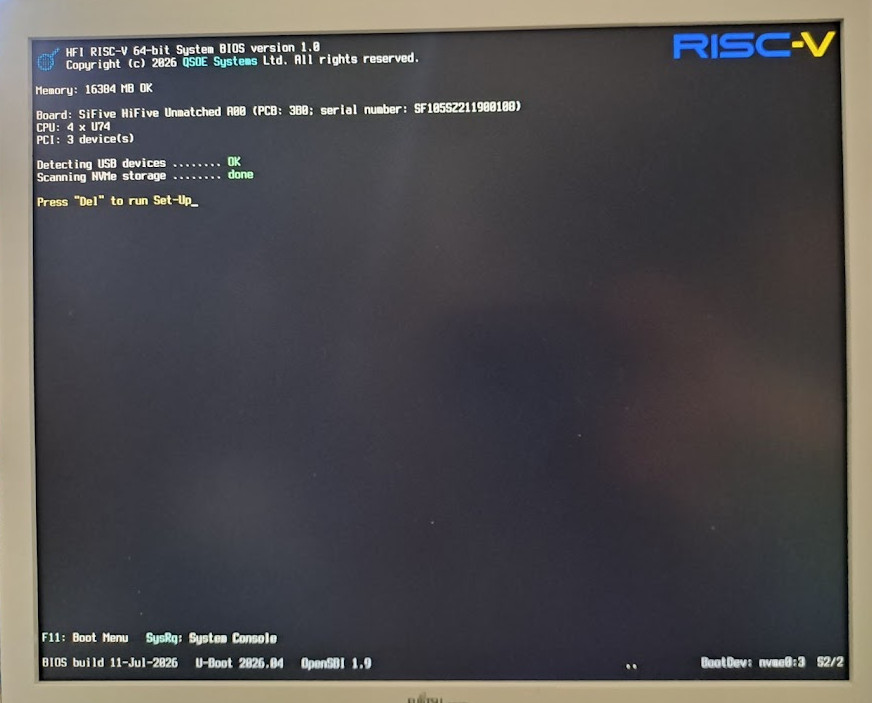
What HFI BIOS 1.4 puts on the screen today:
- A power-on greeting — the VideoBIOS identity, the main POST screen, the memory count, USB, NVMe and UFS enumeration, and the network link brought up and reported.
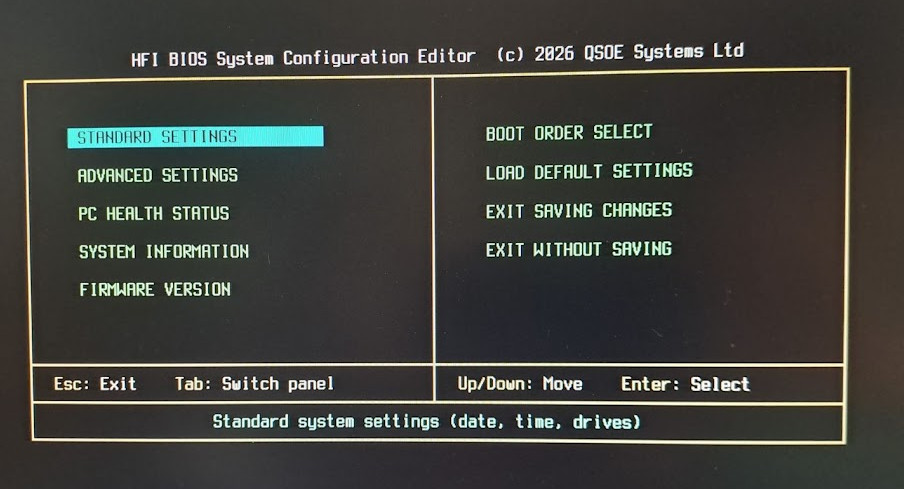
- A configuration editor — the Set-Up screen, in the idiom of the classic Award BIOS: standard and advanced settings, PC Health Status with the board's own sensors, boot order, and the Flash Utility, which writes a firmware package to the board's NOR and refuses one built for a different board.
- A system console — the U-Boot prompt underneath it all, a keystroke away for when you want it.
- A console for whatever comes next — the handoff block, through which a bootloader draws its menu on the monitor and an operating system that understands it keeps a text console after the firmware is gone.
▶ Watch it happen: HFI BIOS on the SpacemiT K3 — cold boot from NOR, POST, Set-Up, and mr-bml on the panel; and the original, HFI BIOS boots the Unmatched.
Get it
Downloads and source
One firmware package per board, written with the Flash Utility from Set-Up — or by the board's own means from a running Linux. The current release is 1.4; the release notes say what changed and what is known not to work yet.
HFI-StarFive-VisionFive2-SysBIOS-1.4.hfifw— StarFive VisionFive 2 (v1.3B).HFI-SpaceMiT-K3-PicoITX-SysBIOS-1.4.hfifw— SpacemiT K3 Pico-ITX.HFI-SiFive-Unmatched-SysBIOS-1.4.hfifw— SiFive HiFive Unmatched.
Every release's packages are at
github.com/qsoe-dev/hfi-bios. The
source is at gitlab.com/bios-riscv/hfi-bios
— make TARGET=visionfive2, or k3, unmatched,
qemu, fetches U-Boot and OpenSBI itself — and the VideoBIOS modules are their own
repositories under gitlab.com/bios-riscv/videobios,
one per display controller plus the runtime they share. The two ABI headers a bootloader or
an operating system needs are MIT, so any consumer can carry them verbatim.
The invitation
An open initiative
HFI is offered as an initiative, not a product to license. Its reference software is open by construction — HFI BIOS links U-Boot and carries U-Boot's licence — and QSOE Systems stewards the whole: the interface specification, a high-quality reference implementation, and the porting to new controllers.
Board vendors are invited to adopt it, to co-develop the interface for their own display controllers, and to be — for their platform — the first to ship a board that greets its user like a finished computer. Harmonization is not a standard handed down from above; it is a shared interface any vendor can build to.
Back to QSOE Systems